
Evidence by issuer.
A judgment you can defend.
One profile per ticker holds the filings, the seven analyses, the notes, the decisions and the deals, each with its source and its date. Connect your own Claude or ChatGPT: it reads the same record, adds and modifies, and never deletes.
- Price
- $50 / monthUSD, one plan, nothing metered
- Early access
- FreeNo charge without your consent
- Coverage
- CA & USMicro and small caps, special situations
- AI model
- None insideYou connect Claude or ChatGPT
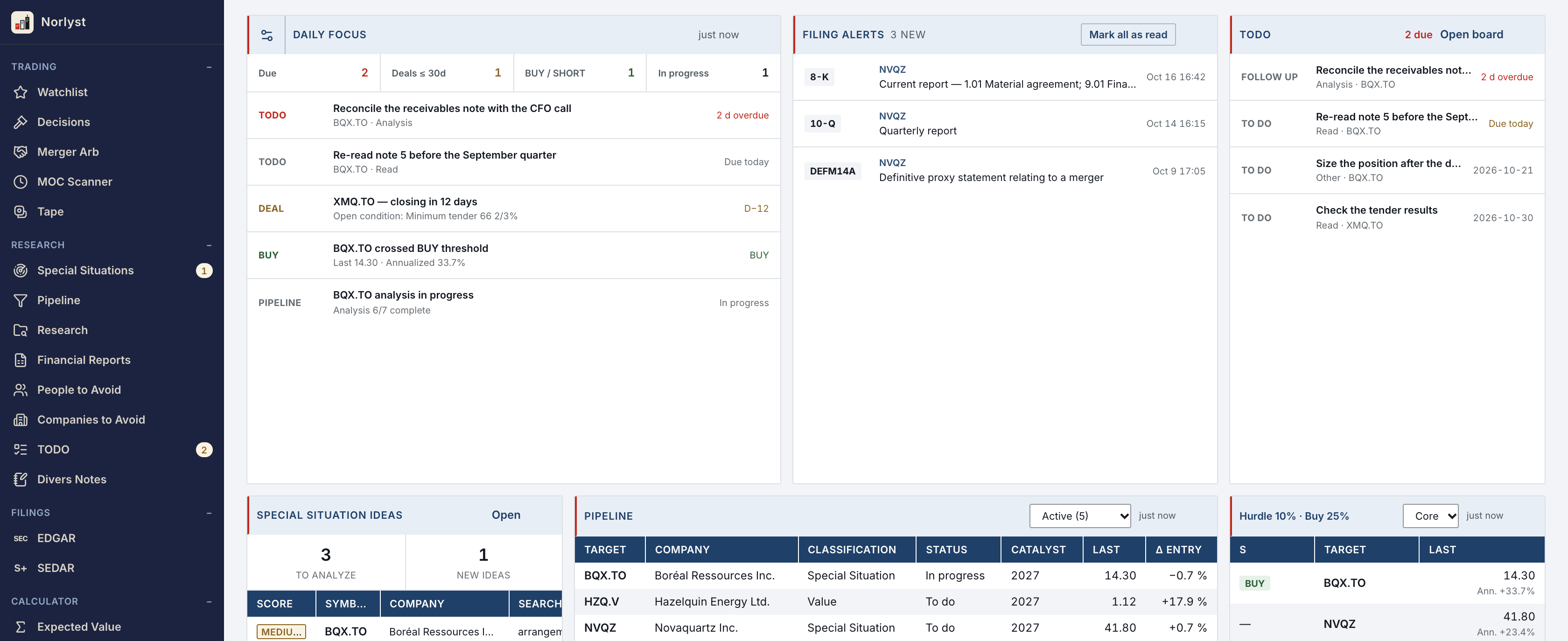
Your research is spread across seven places.
Filings sit in one place, notes in another. The model is a spreadsheet, the analysis you ran in Claude is forty threads back, and the alert email was never filed. Norlyst keeps each of them attached to the issuer it concerns.
The profile is the unit of work.
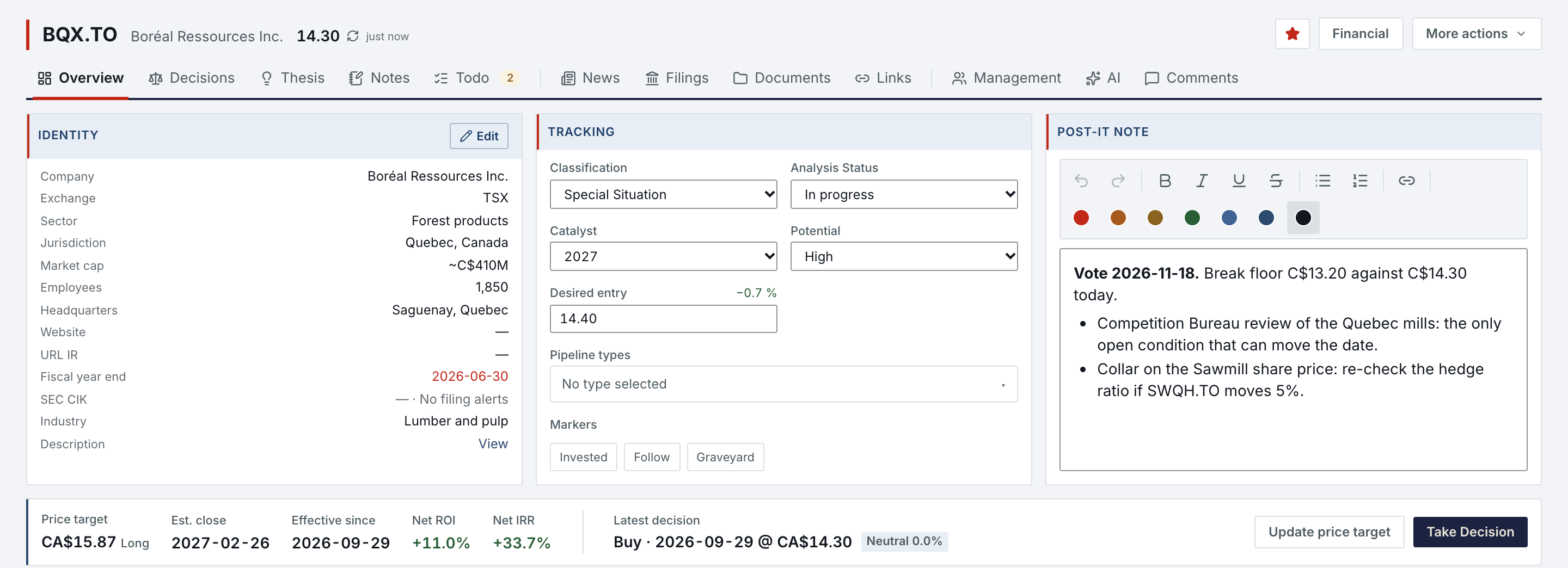
Twelve pages under one symbol, in three families: what you think (Overview, Decisions, Thesis, Notes, Todo), what the issuer published (News, Filings, Documents, Links) and what you concluded (Management, AI, Comments).
- Tracking
- Classification, analysis status, catalyst, potential and your desired entry, set on the Overview's Tracking card.
- Target
- The price target band: target, estimated close, net ROI and IRR, and the latest decision with its recorded price.
- Avoid
- People to Avoid and Companies to Avoid: your own registers, with dated decisions and sources, surfaced on every profile they touch.
- Kept
- Every earlier version of an analysis, with its source document and date.
Pull the filings, keep the statements.
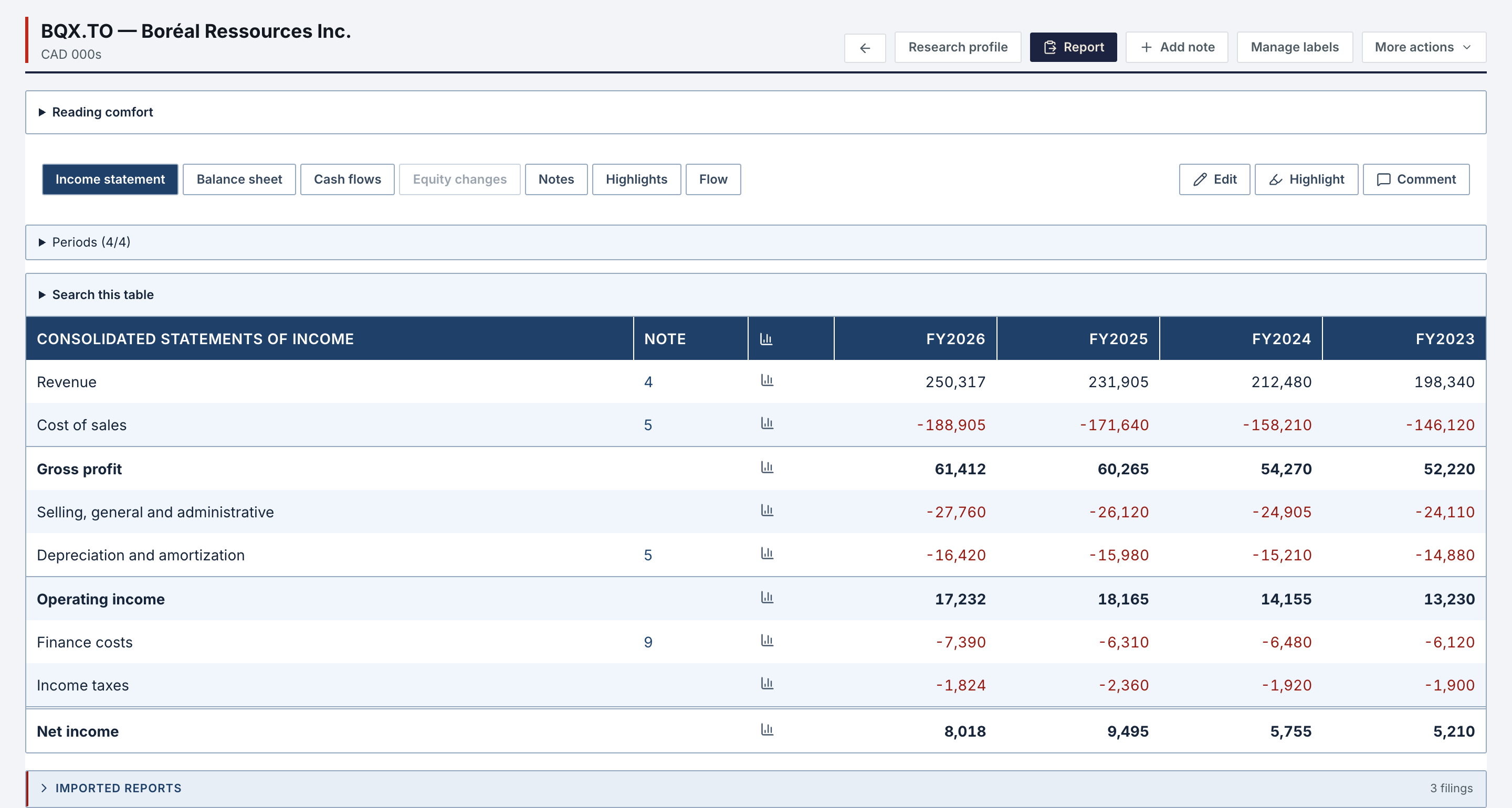
Every profile lists the issuer's filings of the last five years. Read one as published, then extract its statements: they merge by period end with the ones you already hold, the most recent source wins, and provenance stays attached.
- Reader
- The filing as published: its own layout, a table of contents, the Original view with its images. SEC filings for US issuers; SEDAR+ filings for Canadian ones open as PDF, through a Canadian filings service you subscribe to.
- Extract
- Extract latest takes an issuer's last 10-Ks and 10-Qs, five and four by default, into Financial Reports in one click, skipping the periods you already hold. Notes stay clickable, and the filing extractor skill, in your own assistant, adds the important ones as highlights.
- Alerts
- Turn on filing alerts for a profile, and each new SEC filing in the categories you chose shows on the Home and on its Filings page for 14 days, with a system notification on the Mac and the web while the app is open.
Norlyst runs no model. You bring the assistant.
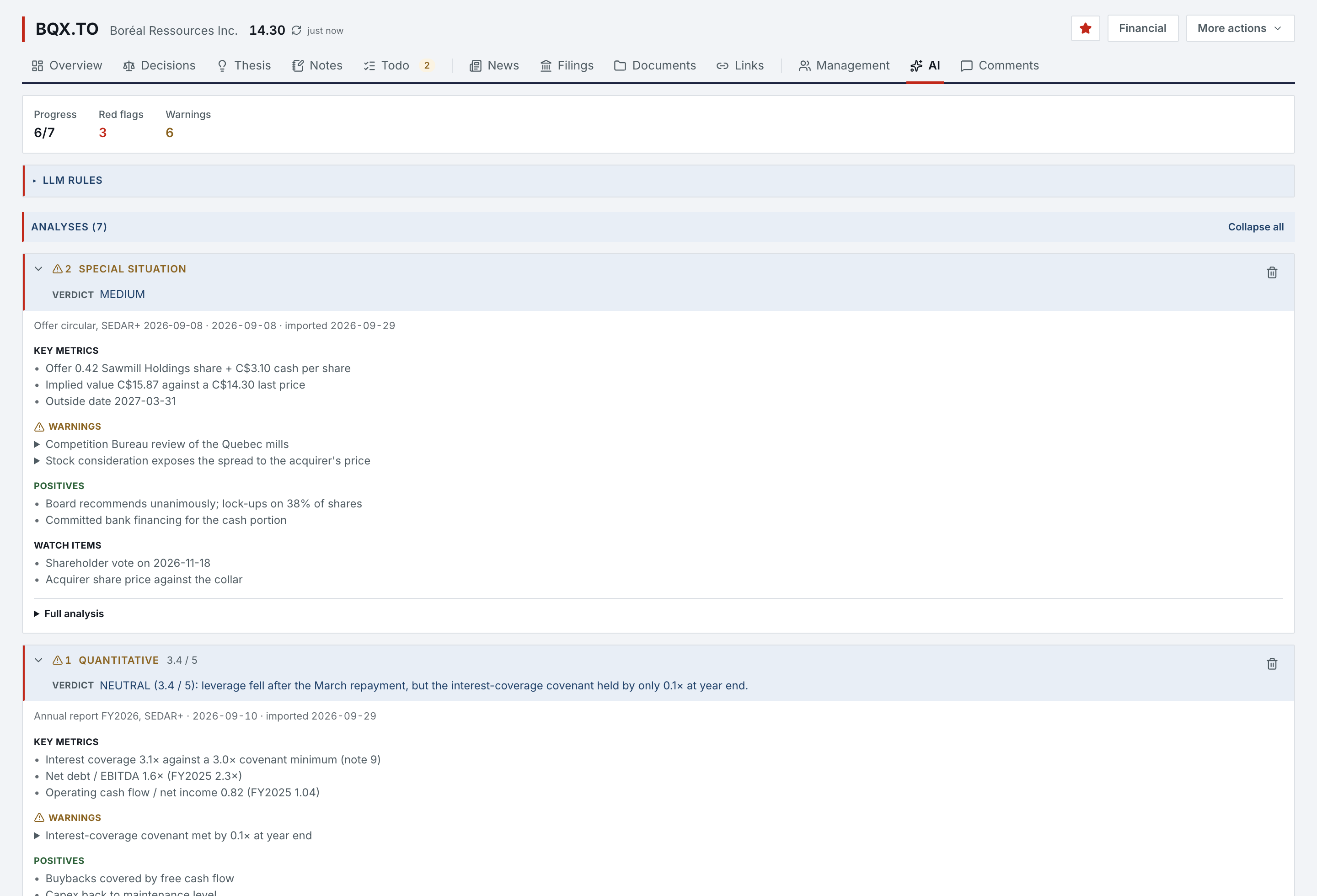
There is no model inside Norlyst and no key held for you. Norlyst hands you the methods; the analysis runs in your own Claude or ChatGPT, under your subscription. Every analysis lands as a new version, never over the last one.
- Connect
- Claude, ChatGPT, Claude Code or Codex, approved on a Norlyst page. It reads your profiles, notes, ideas, deals, registers and financial reports, and a profile's SEC filings and documents. It adds and modifies what you wrote and never deletes; for 10 days, a value it replaced can be put back, as long as nobody has changed it since.
- Skills
- The AI Skills page holds the seven analysis methods, an orchestrator that runs all seven on a profile in one pass, and two financial-report skills, for Claude Desktop and claude.ai. ChatGPT reads the same methods through the connector.
- Rules
- Your LLM Rules (an output language, your philosophy, your thresholds) are read by every method before it starts. They shape the judgment, never the format.
- Import
- Each analysis ends with an import block. Your assistant shows its verdict and its count of red flags and warnings, then imports it once you agree; or you paste the report and check the same preview.
| Analysis | Verdict scale | What it settles |
|---|---|---|
| Special situation | LOW · MEDIUM · HIGH | What the event is, who must act, by when, and the deal file for the monitor. |
| Quantitative | a mark out of 5 (3.4 / 5) | Notes, accounting quality, capital structure, the gap between cash flow and earnings. |
| Forensic | LOW · MODERATE · HIGH · CRITICAL risk | Fifty tests, Beneish and Altman, the non-GAAP bridge, what the narrative hides. |
| Qualitative | free text | Management tone across quarters, guidance credibility, narrative against numbers. |
| Due diligence | LOW · MEDIUM · HIGH risk per category | Litigation, employer reputation, short reports, customer complaints. |
| Management | GREEN · YELLOW · RED per person | Each director and officer, one at a time: past companies, sanctions, conflicts. |
| Valuation | price against a weighted range | DCF, comparables, NAV, LBO capacity: a football field, not a point. |
| Each scale stands on its own. A single number would be false and reassuring, so the seven verdicts are never blended. | ||
Every decision keeps its date and its price, and the price that follows grades it.
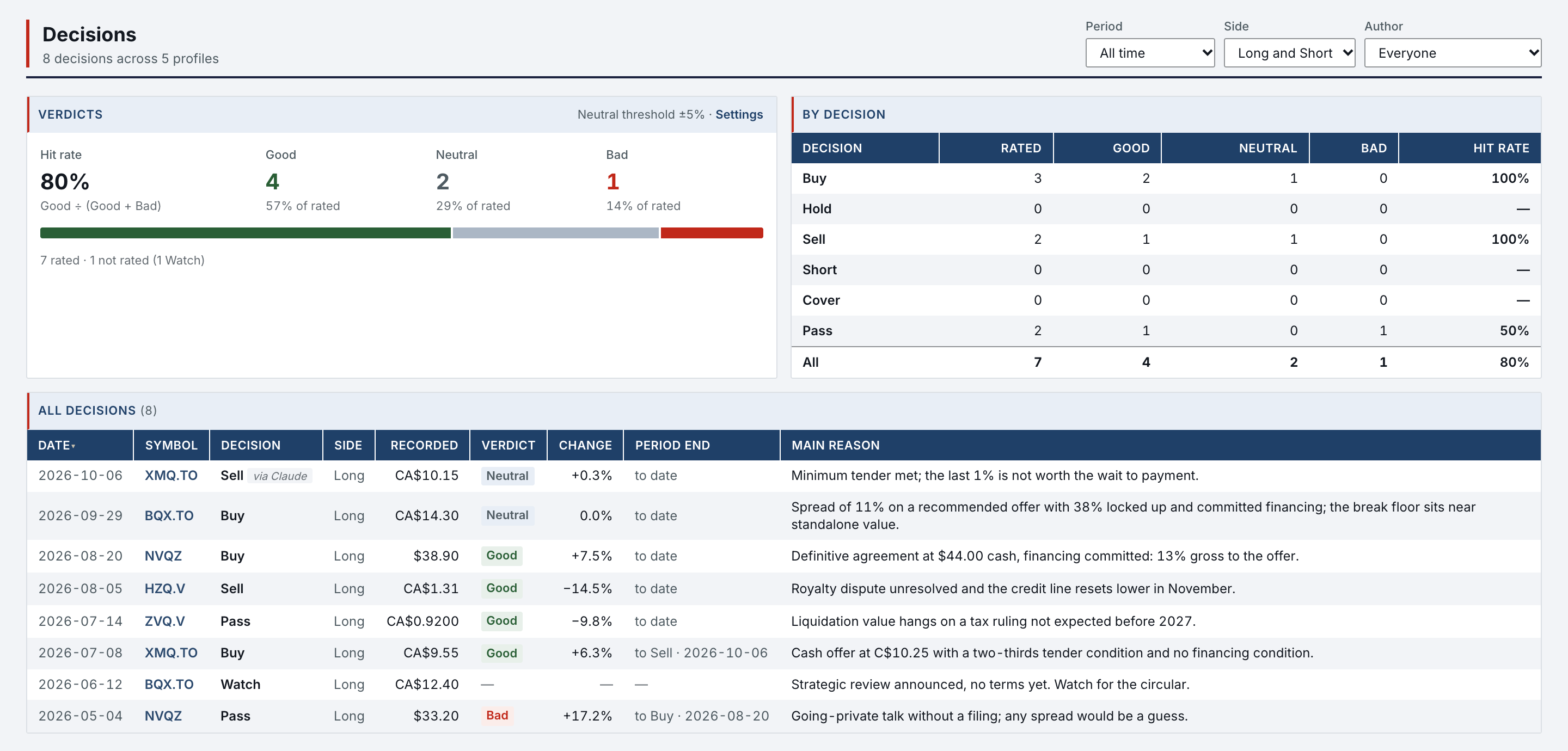
Take Decision records Buy, Hold, Sell, Watch, Pass, Short or Cover with its side, its recorded price and, if you want, a reason. The Decisions page lists every decision across your profiles with its verdict: Good, Neutral or Bad, read from the price since then.
- Verdict
- Recomputed at every reading from the recorded price and today's quote, against a neutral band you set, 5% by default. Change the band and the whole history is rated again; a hit rate follows every filter.
- Target
- The price target keeps its own journal of dated revisions, with side, price and estimated close. A decision never changes it, and it draws as a line on the price chart.
- Retro
- The retrospective takes the thesis as it stood and what actually happened, and sends the rule you draw back into the profile.
Cash and share deals in one table, read as a portfolio.
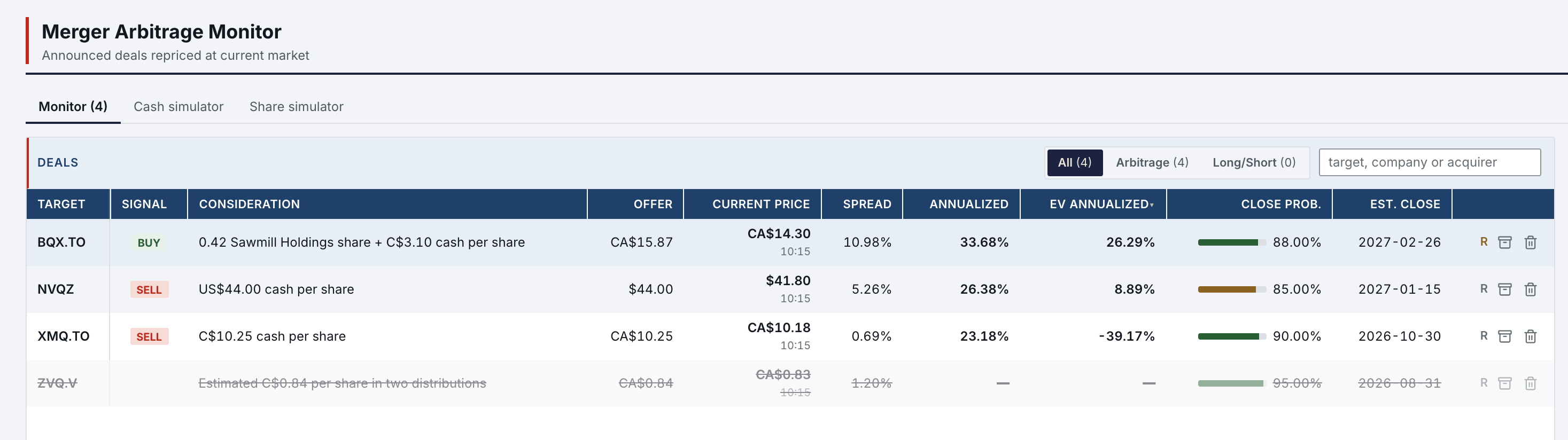
The Merger Arb Monitor lines up every open deal from both simulators. Spreads, annualized returns and days to close come from the same engines the simulators use: a number that differed would be a bug, not a rounding.
- Two
- Cash Deal (XIRR on cash mergers, liquidations and tender offers) and Share Deal (stock-for-stock spreads and hedge ratios) share one deal profile: terms, conditions, milestones, close probability.
- Import
- A special-situation analysis carries its deal file. Import it into a simulator: the facts from the filing fill the form, and your own assumptions keep their defaults. Nothing is saved until you click Save.
- EV IRR
- Each deal also shows an EV IRR: the return on the expected value between the offer and the break price, weighted by the close probability.
A threshold you set, crossed while you were elsewhere.
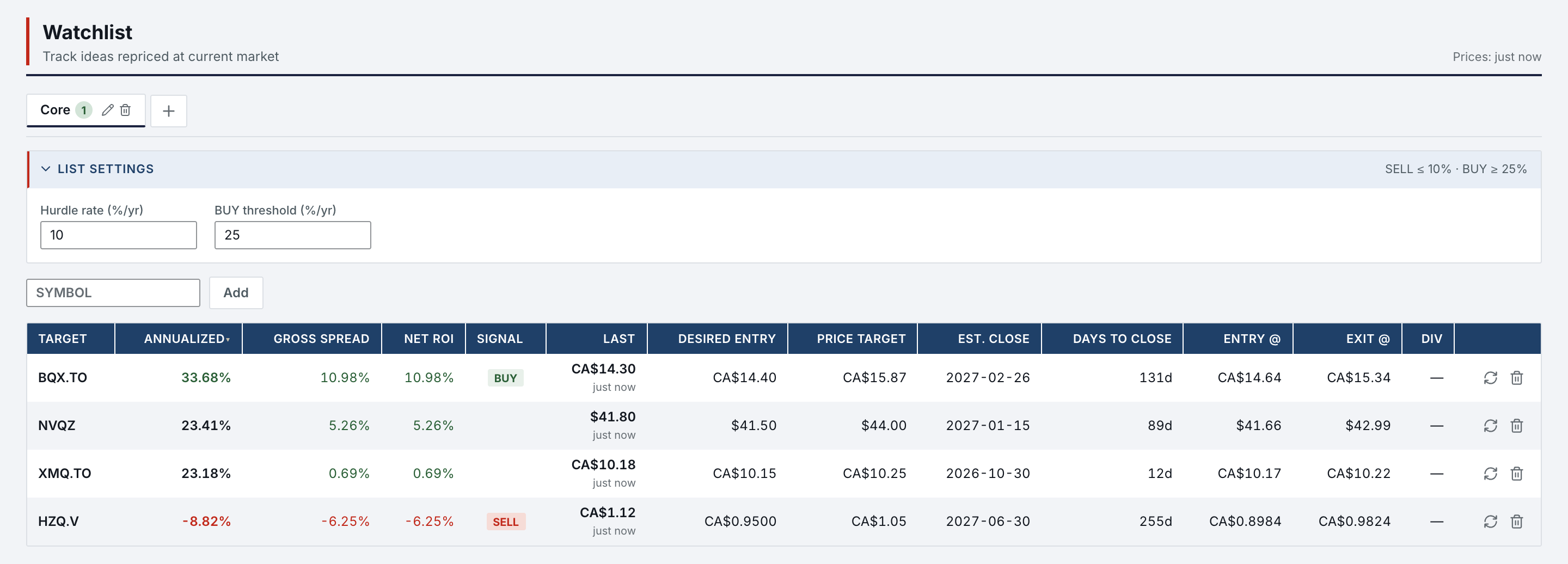
The Watchlist computes the IRR from today's price to the price target in force, at its date, dividends included. When it clears the list's threshold the row reads BUY, and the Daily focus on the Home lists it among the day's exceptions. No push, no email: it is there when you open the app.
- Rule
- Two thresholds per list: SELL at or below the hurdle, 10% by default; BUY at or above the entry threshold, 30% by default. A short reads SHORT, COVER or HOLD.
- Dividends
- A recurring dividend (amount, frequency, start date) runs to the estimated close; one-off payments sit beside it.
- Focus
- The Daily focus counts what is due, the deals closing within 30 days, the thresholds crossed and the analyses in progress.
Nothing enters the record without a destination.
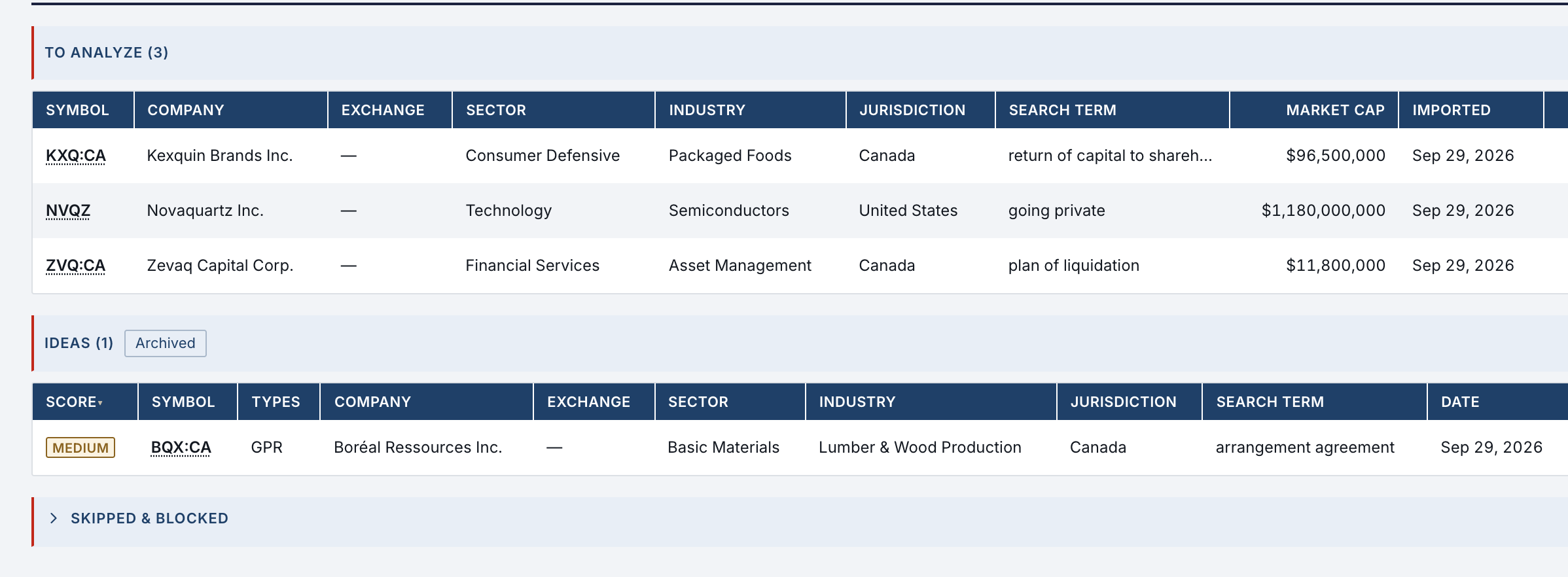
Clips wait in an inbox until they are filed to a profile, to Divers Notes or to an avoid register. Alert emails wait in a triage queue until an idea is validated.
- Clipper
- Norlyst Clipper for Safari on macOS and iOS, and for Firefox: a link, a selection or the whole article, with its URL and date. Each installation pairs once and can be revoked on its own.
- Share
- The Share sheet on iPhone, iPad and Mac takes a link, text, a document or an image. It is saved on the device first, then uploaded with visible steps: Ready, Uploading, Verifying, Saved.
- Triage
- Paste an alert email, or let your assistant add the idea. Eligible items join the To-analyze queue; validated ideas are promoted to a profile or a simulator, and Skip and Block each leave a dated event.
Your research leaves with you, every day.
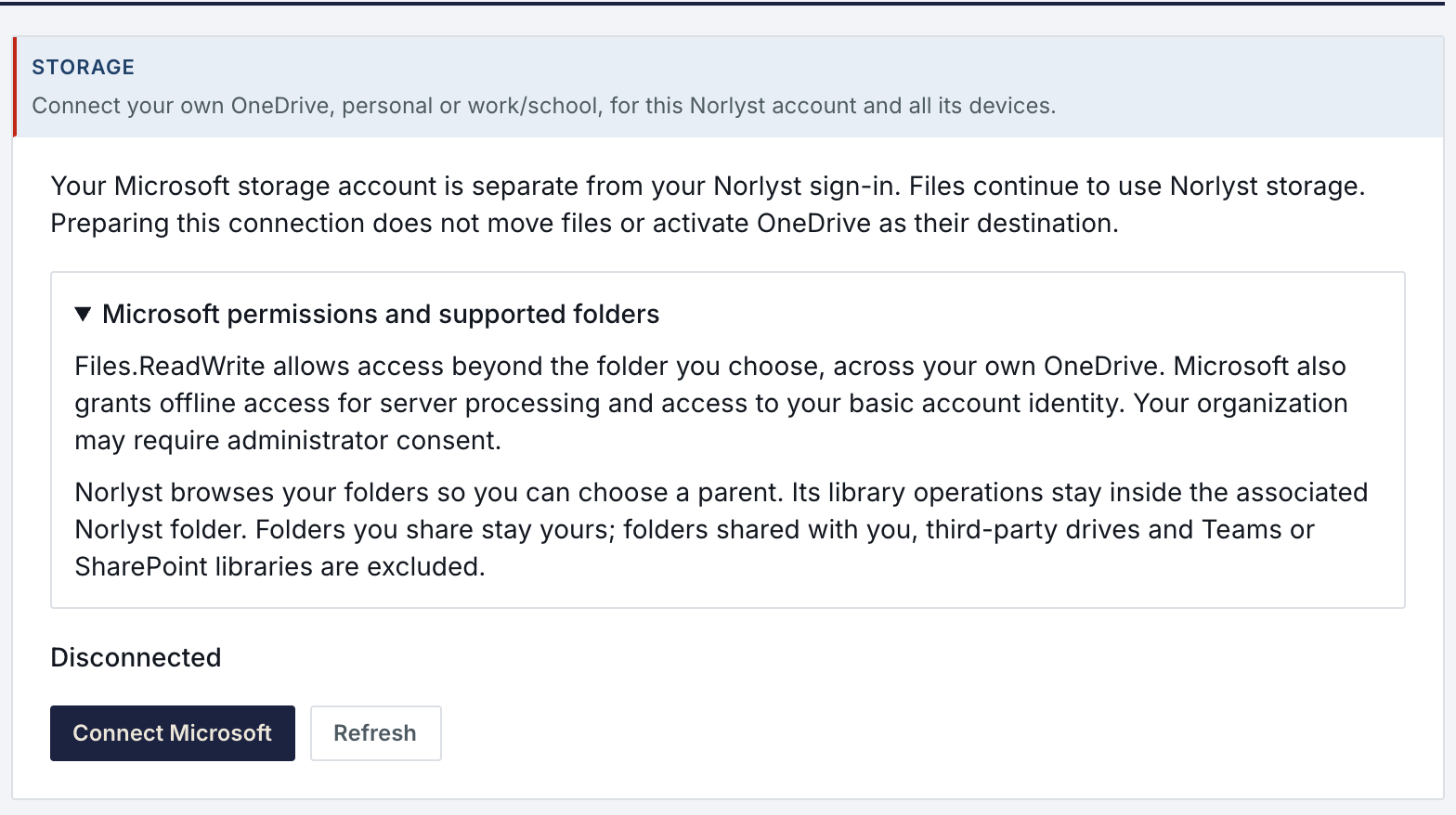
Your files can live in your own OneDrive, and the whole workspace is exported to it daily. Nothing you wrote is locked in.
- OneDrive
- Optional. Connect a personal or work OneDrive and your documents, note images and clips are kept there, in one Norlyst folder; Norlyst keeps the catalog. Existing files move over with verification.
- Daily
- With OneDrive connected, a Markdown and JSON export of the whole workspace lands in it every day, readable without Norlyst.
- Profile
- Any profile exports as structured text for your next session, in Norlyst or elsewhere.
- Delete
- Close the account from the app; the workspace is purged within 24 hours.
| Platform | What it adds | Availability |
|---|---|---|
| Web | The full workbench in the browser. | app.norlyst.com |
| iPhone & iPad | The same workspace; pull down to search a symbol; Safari extension and Share sheet. | App Store |
| macOS app | Native calls to data sources, a filings viewer, Safari extension and Share sheet. | Mac App Store, coming soon |
| Sign-in | Google or Apple. One account, one private workspace, synced on every device. | Included |
One plan, with everything in the sidebar.
$50per month, USD
Free during early access. Billing has not started: you will be told by email 30 days before any first charge, and nothing is charged without your consent. No tiers, no seats, no per-ticker fee.
Features that reach a third party through your own account (your AI assistant, a Canadian filings service, Substack, OneDrive) say so, and cost what those services cost you.
“I built this for my own desk: one analyst, Canadian and US small caps, filings read end to end. Every rule in it is something I got wrong once.”

Access is granted in small batches.
Create your account now. It waits until access is granted, and nothing is charged.
- 01
Sign in at app.norlyst.com with Google or Apple.
- 02
Your account waits on a page that says so; no workspace opens yet.
- 03
Access is granted, and your workspace opens at your next sign-in, on every device.
Questions first? [email protected] · Privacy