
Seven analyses, run in your own assistant, checked before they land.
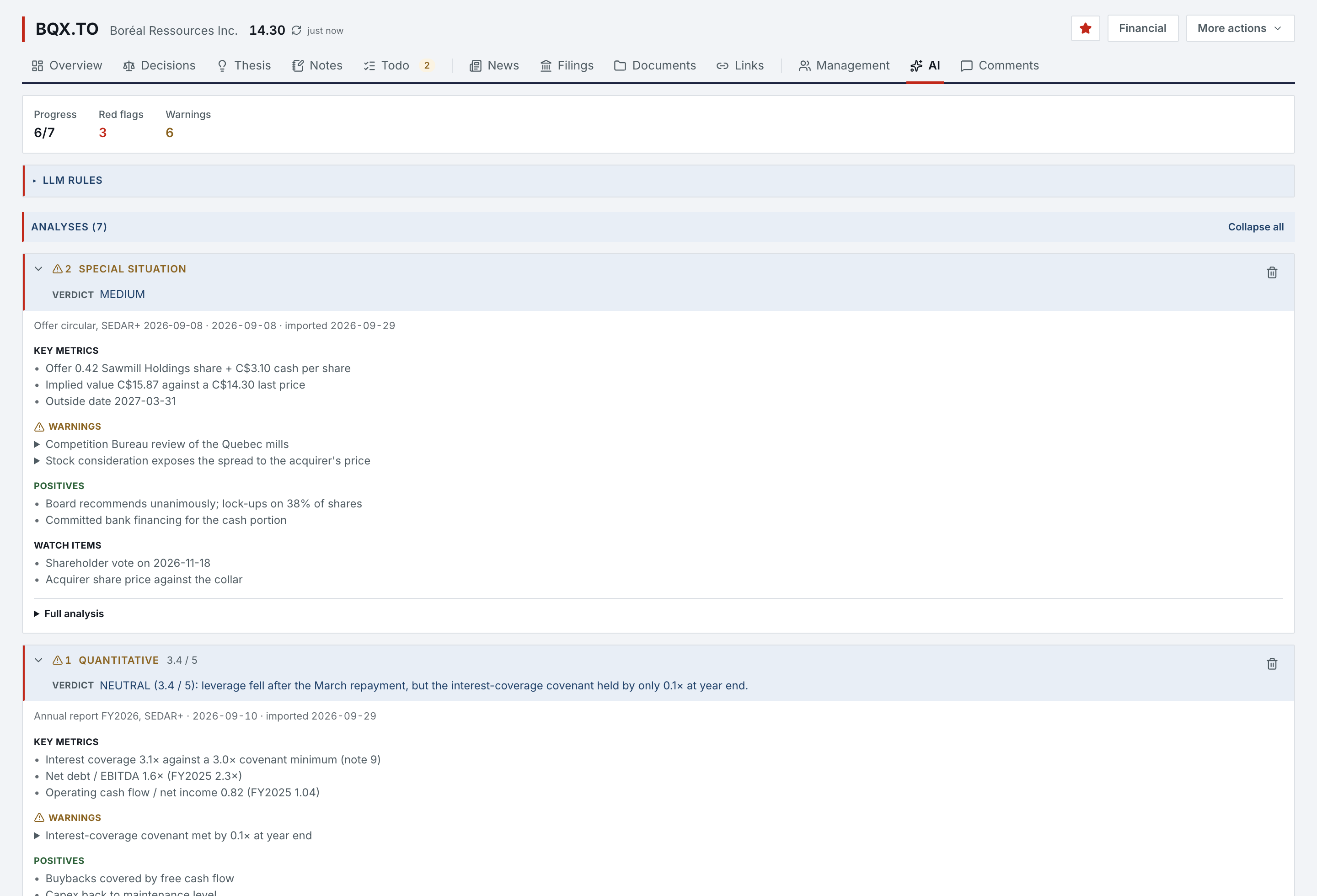
There is no model inside Norlyst and no key held for you. The AI Skills page hands you the methods; the analysis runs in your own Claude or ChatGPT, under your subscription. Every analysis lands in its profile as a new version, after you have seen its verdict and its findings.
- Analyses
- 7 kindsEach verdict on its own scale
- Skills
- 10Seven analyses, an orchestrator, two report skills
- Model inside
- NoneYou connect Claude or ChatGPT
- Undo
- 10 daysA value your assistant replaced can be put back
- Connect
- Claude, ChatGPT, Claude Code or Codex, approved on a Norlyst page. It reads your profiles, notes, ideas, deals, registers and financial reports, and a profile’s SEC filings and documents.
- Never deletes
- A connected assistant adds and modifies what you wrote and never deletes; for 10 days, a value it replaced can be put back, as long as nobody has changed it since.
- Rules
- Your LLM Rules (an output language, your philosophy, your thresholds) are read by every method before it starts. They shape the judgment, never the format.
- Kept
- Every earlier version of an analysis stays in its history, with its source document and date, and the full report sits beside the profile.
The methods are files you download, versioned.
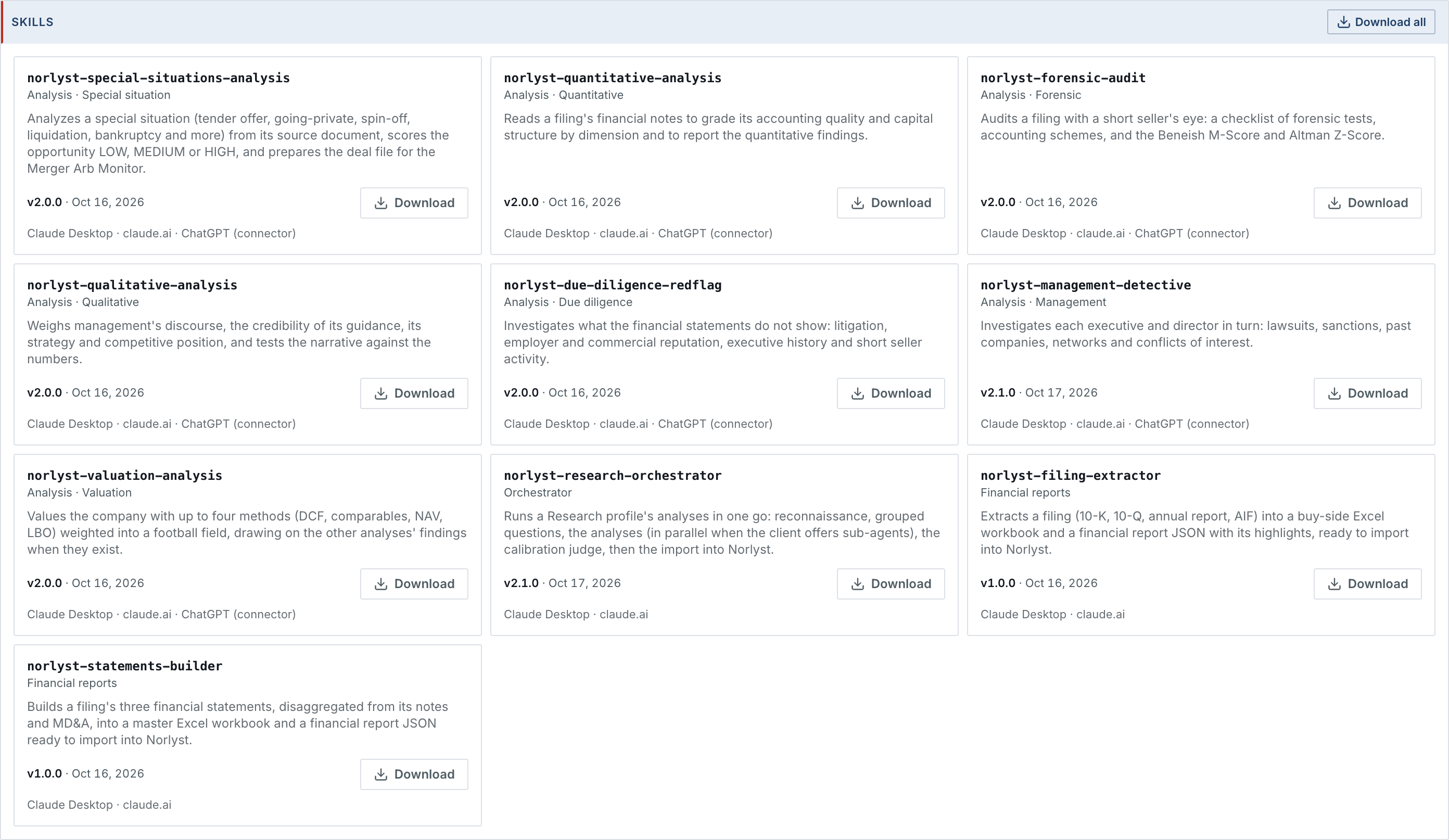
The AI Skills page holds ten Norlyst skills for Claude Desktop and claude.ai: the seven analyses, a research orchestrator that runs all seven on a profile in one pass, and two financial-report skills. Each shows its version and date; ChatGPT reads the same methods through the connector.
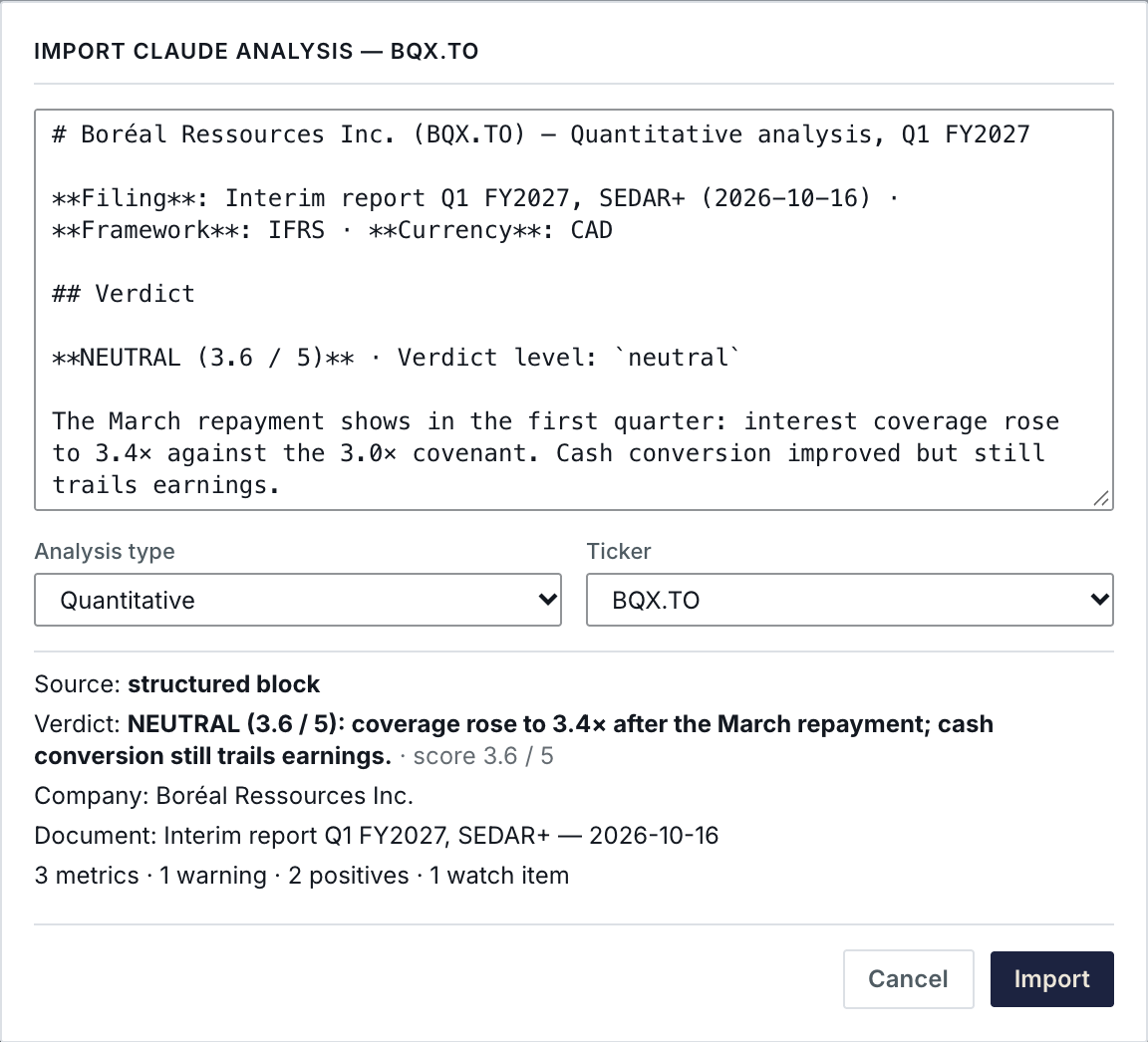
An analysis is checked before it lands.
Paste the report your assistant wrote, or let it import the analysis itself. The preview reads the structured block: the type, the ticker, the verdict and its score, the source document and its date, and the count of metrics, warnings, positives and watch items. Nothing is imported until you click Import.

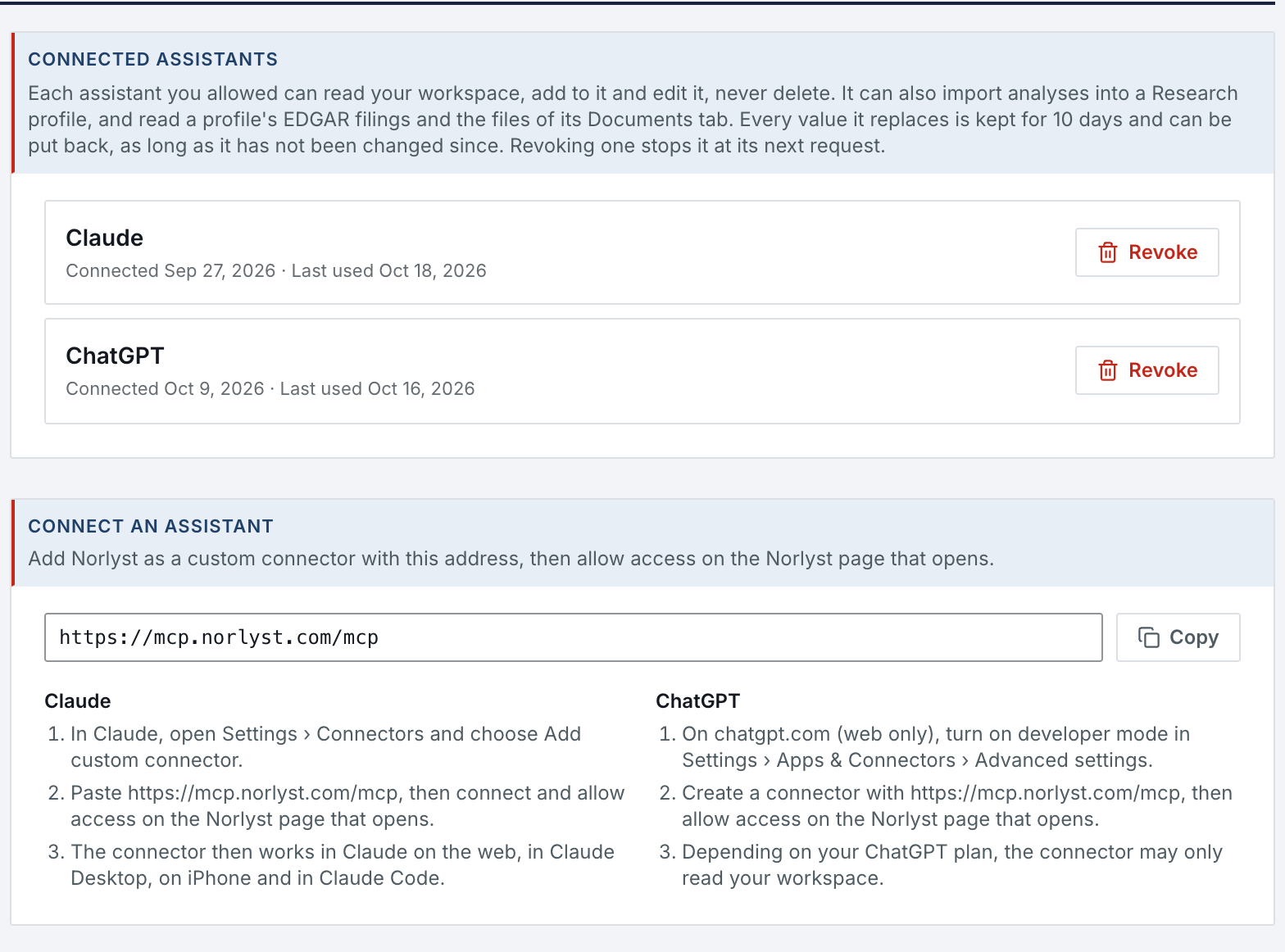
Every connection is yours to see and revoke.
Settings › AI assistants lists each assistant you approved, with the date it was connected and its last use.
- Approve
- An assistant connects only after you approve it on a Norlyst page.
- Revoke
- Revoke any connection in Settings; it also ends after 30 days without use, when your access is withdrawn, or when the account closes.
- Logged
- Each request is logged with the tool it used and its outcome, without its content.
- Quota
- SEC filings an assistant asks for count toward a per-account read quota, by the hour and by the day.
What it needs.
The methods, the import preview and the history need nothing else. The analysis itself runs where your assistant runs.
- Your assistant
- Claude, ChatGPT, Claude Code or Codex, under your own subscription.
- Nothing else
- The AI Skills page, LLM Rules, the import preview, versions and the 10-day undo.
- Without one
- Every table, profile, report and deal works without an assistant; an analysis can be written by hand.
AI analyses & assistants in Features
All 74 features →| # | Feature | What it does | Needs |
|---|---|---|---|
| 16 | Seven analysis kinds | Special situation, Quantitative, Forensic, Qualitative, Due diligence, Management, Valuation. Verdict, findings and evidence lists each: a red flag is sourced, material and blocking, anything less a warning; earlier versions kept with their source document. | Your AI assistant |
| 17 | Structured import & export | Paste an analysis and check its verdict and findings before it lands, or let your assistant import it. A whole profile comes back field by field (same, new, conflict); nothing lands unticked. Canonical export of the profile for the next session. | Your AI assistant |
| 49 | Connect an assistant | Claude, ChatGPT, Claude Code or Codex, approved on a Norlyst page. It reads your profiles and notes, Divers Notes, TODO, situation ideas, merger arbitrage deals, your People and Companies to Avoid registries and your imported financial reports, as text. | Your AI assistant |
| 50 | Filings & Documents | For a profile, the assistant also reads its SEC filings through the filing reader, and the text of the PDF and plain-text files in its Documents tab. A filing Norlyst already holds does not count; a read that has to reach the SEC counts toward a per-account assistant read quota, by the hour and by the day. | SECYour AI assistant |
| 51 | Add and modify, never delete | A connected assistant can add profiles, notes, links, ideas, TODO, decisions and deals, import analyses, and modify what you wrote. It never deletes; for 10 days, a value it replaced can be put back, as long as nobody has changed it since. What it writes carries “via Claude” or “via ChatGPT”. | Your AI assistant |
| 52 | Analysis import | Your assistant imports a finished analysis into its profile: Norlyst checks the block, adds it as a new version, the earlier one kept in its history, and keeps the full report beside the profile. A missing profile is never created on the way. | Your AI assistant |
| 53 | AI Skills | A page under Resources with ten Norlyst skills for Claude Desktop and claude.ai (the seven analyses, the research orchestrator and two financial-report skills), each with its version, date and Download, plus Download all and an installation guide. | Your AI assistant |
| 54 | Research orchestrator | One skill runs the seven analyses of a profile in one pass: a short reconnaissance, all its questions at once, the analyses side by side when your Claude client offers sub-agents, then a calibration judge across every finding, the imports and a synthesis note. | Your AI assistant |
| 55 | LLM Rules | Your output language and your own rules (philosophy, thresholds, conventions) set on the AI Skills page; a profile can add its own, which win in a conflict. Every analysis method reads them before it starts. No rule changes a skill's output format or what counts as a red flag. | Nothing else |
| 56 | Connections you control | Revoke any connection in Settings. It also ends after 30 days without use, when your access is withdrawn, or when the account closes. Requests are logged without their content. | Nothing else |
Access is granted in small batches.
Create your account now. It waits until access is granted, and nothing is charged.
- 01
Sign in at app.norlyst.com with Google or Apple.
- 02
Your account waits on a page that says so; no workspace opens yet.
- 03
Access is granted, and your workspace opens at your next sign-in, on every device.
Questions first? [email protected] · Privacy