
Every filing read as published, every statement kept with its source.
Every Research profile lists its issuer's filings of the last five years: SEC filings, or SEDAR+ ones through your own subscription to a Canadian filings service. The filing reader shows a SEC filing as published, with a table of contents and tables you can recompute. Extract latest takes the last 10-Ks and 10-Qs into Financial Reports, where the statements merge by period end and provenance stays attached.
- Filings
- 5 yearsOn every profile's Filings page
- Extract latest
- One clickThe last five 10-Ks and four 10-Qs by default
- Highlights
- 16 categoriesFour severities, each excerpt verbatim
- Alerts
- Every 10 minA new SEC filing shows for 14 days
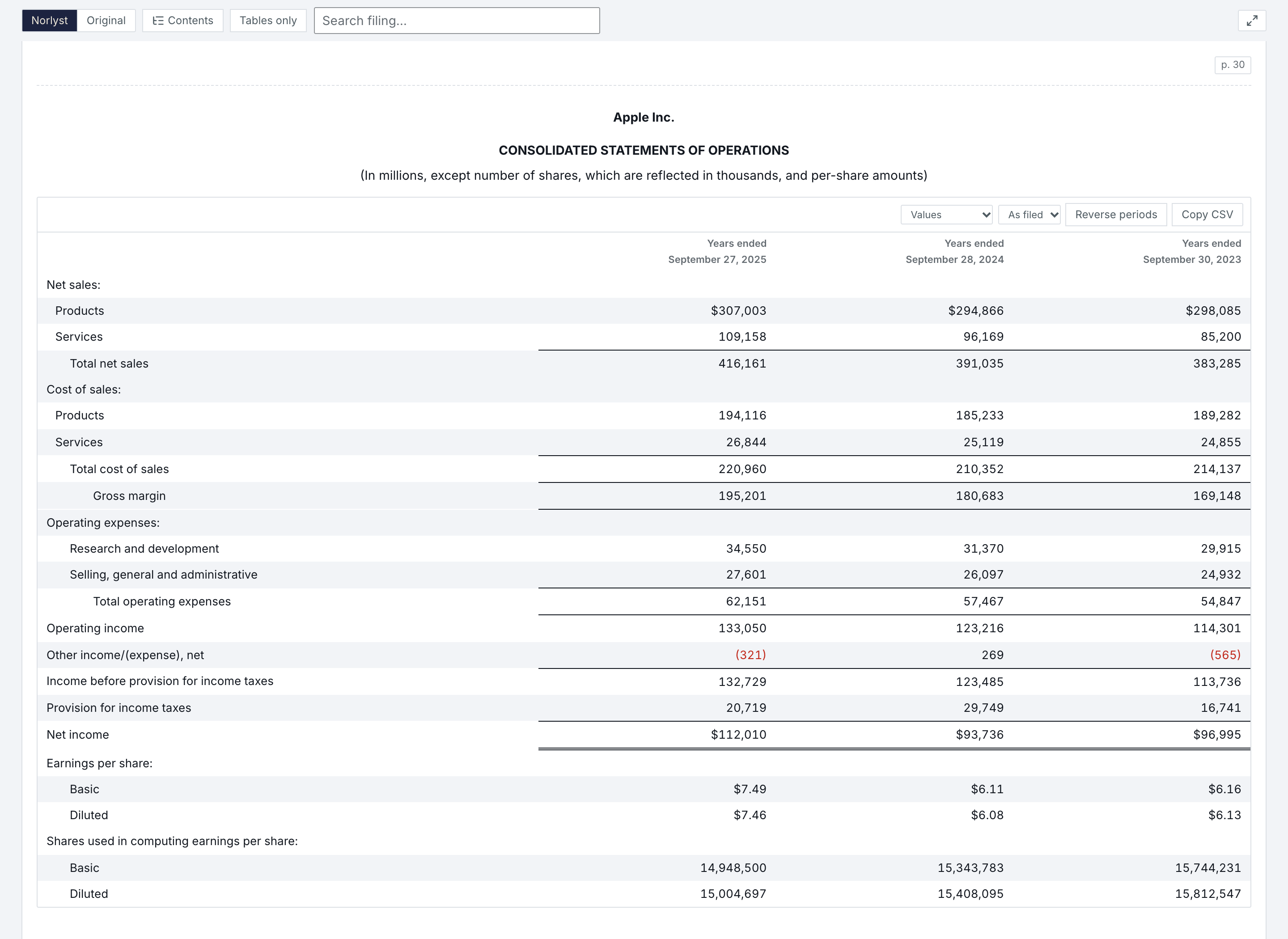
- Contents
- A table of contents from the filing's own headings, a 10-K's Parts and Items included; jump to any statement or note.
- Tables
- Every table shows Values, Common-size or Growth, rounds as filed, to 0 or 1 decimal or ÷ 1,000, reverses its periods and copies as CSV.
- Original
- The Original view shows the filing as the SEC serves it, images included; Tables only keeps just the tables.
- Search
- Search the filing, its text and its tables. The issuer's other filings sit in a menu, and full screen is one click away.
Extract latest, then the statements merge by period.
From a profile's Filings page, Extract latest finds the issuer's latest 10-Ks and 10-Qs and saves each one's statements in Financial Reports, one filing at a time, newest first, at the pace the SEC allows. Amendments are left out, and a period you already hold is skipped, never replaced.
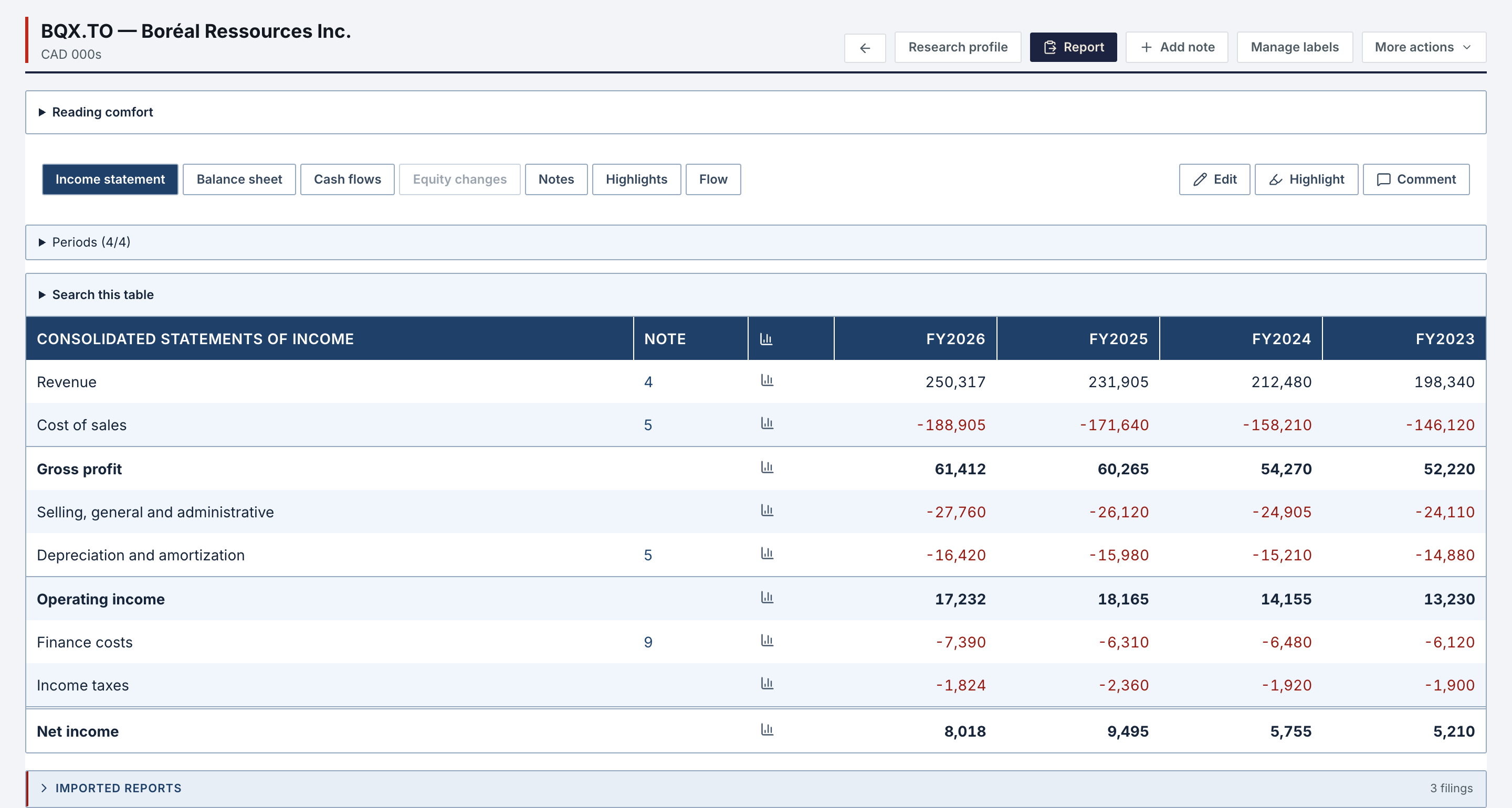
- Merged
- Income statement, balance sheet and cash flows, one column per period end. The most recent source wins; provenance stays attached.
- Notes
- A note reference opens the note in its own filing, even when the note was renumbered between reports.
- Your reading
- Comment or mark any number, chart any traceable line, and give a company's line items your own labels; the published label stays the reference.
What the notes say, before the numbers.
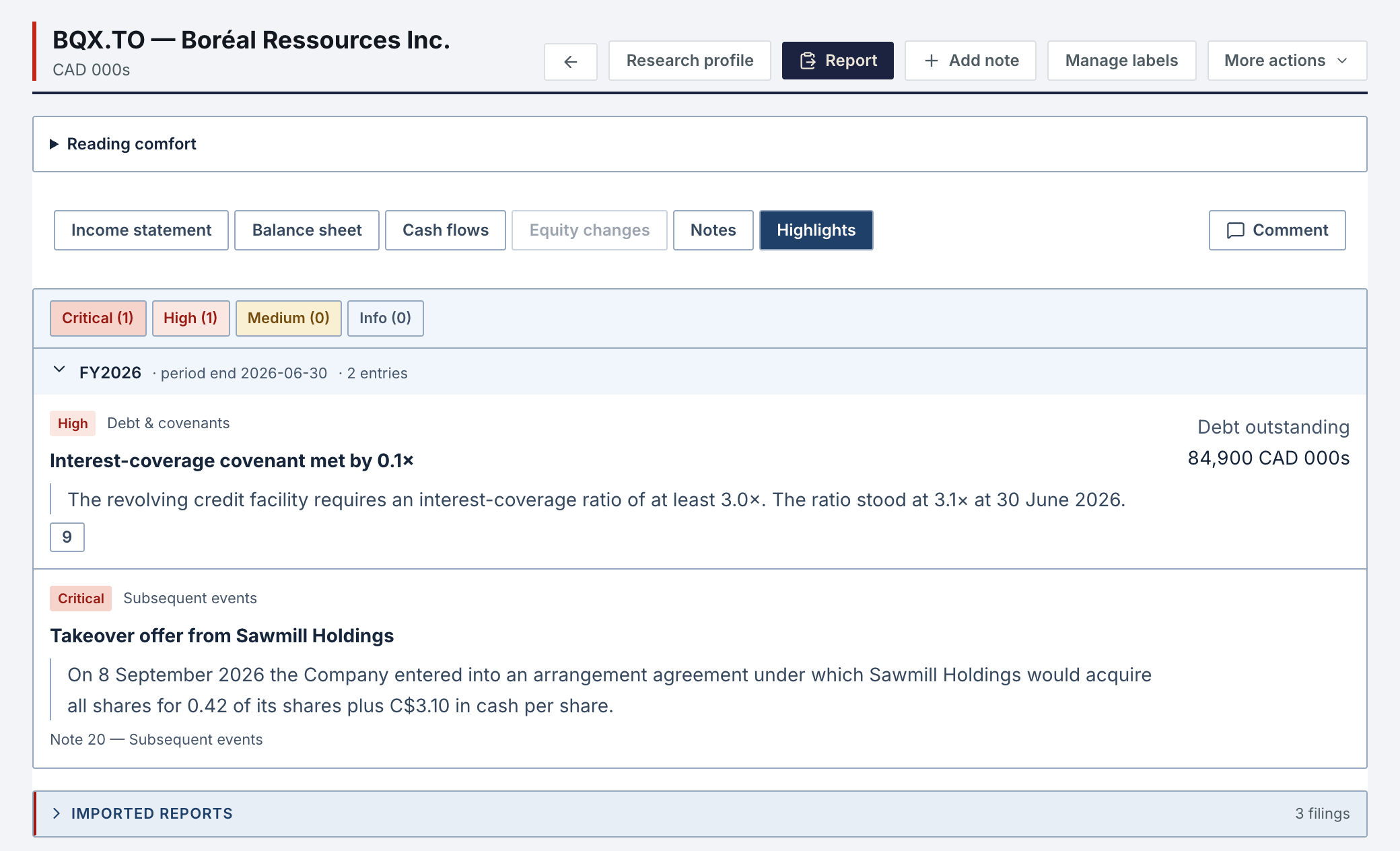
Norlyst's extraction never judges. The filing extractor skill, run in your own assistant, adds what a filing discloses and the statements do not show: subsequent events, going concern, covenants, dilution and twelve other categories. Each entry carries its severity, the verbatim excerpt, the note it comes from and, when the filing gives one, the amount at stake.

A new filing finds you.
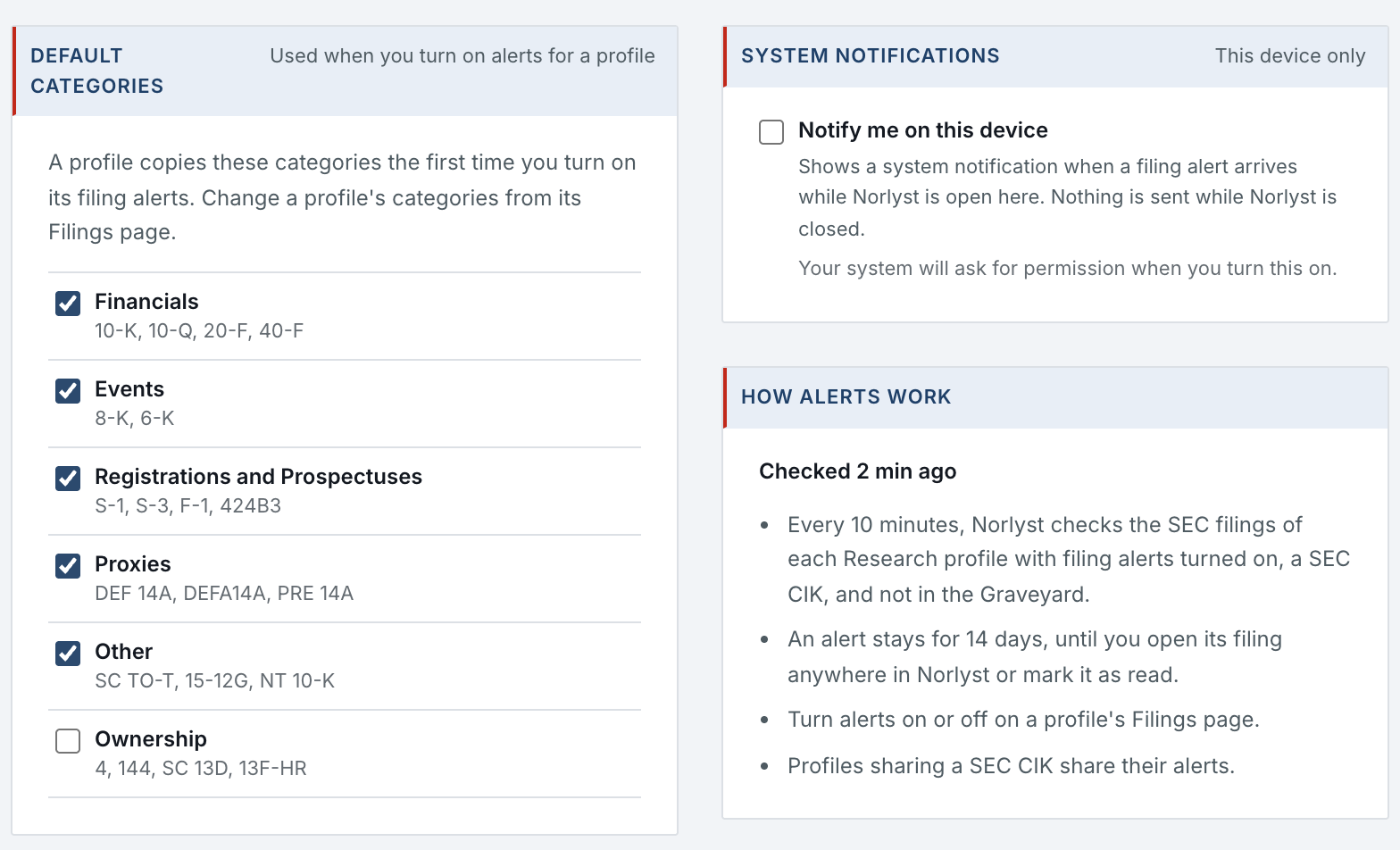
Turn on filing alerts on a profile's Filings page. Every 10 minutes, Norlyst checks the SEC filings of each profile with alerts on; a new filing in the categories you chose shows on the Home and on the profile's Filings page.
- Categories
- Six, from Financials and Events to Ownership. A profile copies your default categories the first time you turn on its alerts, then keeps its own.
- 14 days
- An alert stays 14 days, until you open its filing anywhere in Norlyst or mark it as read.
- Notify
- A system notification on the Mac and the web while Norlyst is open; nothing is sent while it is closed.
- Shared
- Profiles that share a SEC CIK share their alerts.
EDGAR and SEDAR+, for any issuer.
Outside a profile, the EDGAR page finds a SEC filer's filings by ticker, and the SEDAR page a Canadian issuer's, through your own subscription to a Canadian filings service.
- EDGAR
- 10-K, 10-Q, 8-K, DEF 14A and DEFM14A by ticker. Markdown with exhibits, iXBRL extraction, and the SEC's own PDF on request.
- SEDAR+
- Financials, MD&A, AIF and circulars by issuer, filtered by document type; View, Download or Convert to Markdown.
- Batch
- Tick a set of filings and take them all, sequentially and paced, Markdown or PDF per pass, with a cancel that finishes the current item.
What it needs.
SEC filings need no account of yours: Norlyst reads EDGAR at the pace the SEC allows.
- Nothing else
- SEC filings, the reader, Extract latest, Financial Reports and filing alerts.
- Canadian filings
- Your own subscription to a Canadian filings service, for SEDAR+ documents.
- Your assistant
- For Highlights, through the filing extractor skill. A connected assistant reads SEC filings within a per-account quota.
Filings & Financial Reports in Features
All 74 features →| # | Feature | What it does | Needs |
|---|---|---|---|
| 22 | Merged statements | Income statement, balance sheet and cash flow from several filings, one column per period end. The most recent source wins; provenance stays attached. | Nothing else |
| 23 | Clickable notes | A note reference opens the note in its own filing, even when the note was renumbered between reports. | Nothing else |
| 24 | Detailed statements | Build-up view from the filing extractor skill: the components first, the aggregate line after, SG&A preceded by its twelve parts. | Your AI assistant |
| 25 | Analysis sheets | Ratios and models from the filing extractor skill, recalculated from the merged statements, with their own highlights. | Your AI assistant |
| 26 | Highlights | The important notes of a filing (going concern, covenants, subsequent events, dilution), classified by taxonomy and severity by the filing extractor skill, with the verbatim excerpt and the disclosed amount. | Your AI assistant |
| 27 | Cell comments, marks & charts | Comment or mark any number; the note stays with the line and the profile. A line chart for any traceable row across every period held. | Nothing else |
| 28 | Reading preferences | Your own aliases and labels for a company's line items, the periods you want to see, search and filters in every table. The published label stays the reference. | Nothing else |
| 29 | Debug mode | The extraction's verification surfaces, source evidence and tie-outs, stay hidden until you switch them on. | Nothing else |
| 30 | EDGAR | 10-K, 10-Q, 8-K, DEF 14A and DEFM14A by ticker. Markdown with exhibits, iXBRL extraction, and the SEC's own PDF on request. | SEC |
| 31 | Extract latest | An issuer's last 10-Ks and 10-Qs, five and four by default, extracted into Financial Reports in one click, skipping the periods already held. | SEC |
| 32 | Filing reader | Every profile lists the issuer's filings of the last five years. The reader shows a filing as published: its layout, a table of contents, the Original view with its images. | SEC |
| 33 | Filing alerts | Turn alerts on for a profile and each new SEC filing in the categories you chose shows on the Home and on its Filings page for 14 days, with a system notification on the Mac and the web while the app is open. | SEC |
| 34 | SEDAR | Canadian filings by issuer through your own subscription to a Canadian filings service: financials, MD&A, AIF, circulars. View, Download, Convert to Markdown; filters by document type. | Canadian filings service |
| 35 | Batch downloads | Tick a set of filings and take them all, sequentially and paced, Markdown or PDF per pass, with a cancel that finishes the current item. | Nothing else |
| 36 | Filings viewer | Native tabs on SEC and SEDAR+ documents, isolated from the app and limited to those hosts. | macOS |
Access is granted in small batches.
Create your account now. It waits until access is granted, and nothing is charged.
- 01
Sign in at app.norlyst.com with Google or Apple.
- 02
Your account waits on a page that says so; no workspace opens yet.
- 03
Access is granted, and your workspace opens at your next sign-in, on every device.
Questions first? [email protected] · Privacy