
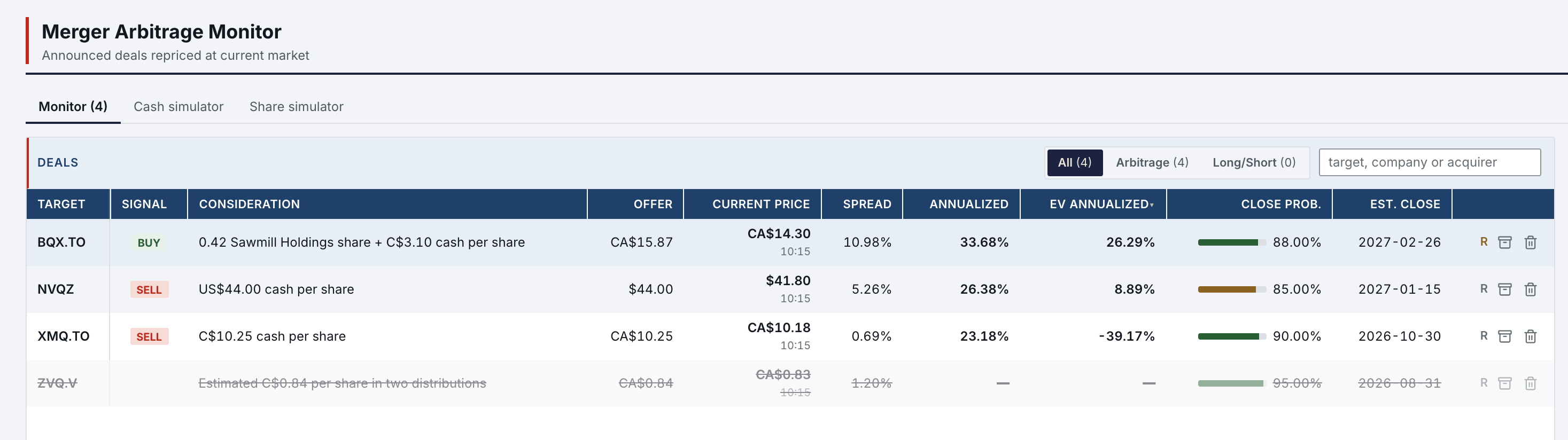
Every open deal, priced from its terms and its odds.
The Merger Arb Monitor lines up every deal from the Cash and Share simulators: spread, annualized return, EV IRR, close probability and estimated close, from the same engines the simulators use. Each deal keeps its file: terms, closing conditions, milestones and a break scenario.
- Simulators
- 2Cash Deal and Share Deal, one deal profile
- Return
- EV IRROn the expected value between the offer and the break price
- Odds
- Close probabilityYours, per deal, in every return
- Import
- From an analysisNothing is saved until you click Save
- Two
- Cash Deal (XIRR on cash mergers, liquidations and tender offers) and Share Deal (stock-for-stock spreads and hedge ratios) share one deal profile: terms, conditions, milestones, close probability.
- Import
- A special-situation analysis carries its deal file. Import it into a simulator: the facts from the filing fill the form, and your own assumptions keep their defaults.
- EV IRR
- Each deal also shows an EV IRR: the return on the expected value between the offer and the break price, weighted by the close probability.
Each deal carries its own file.
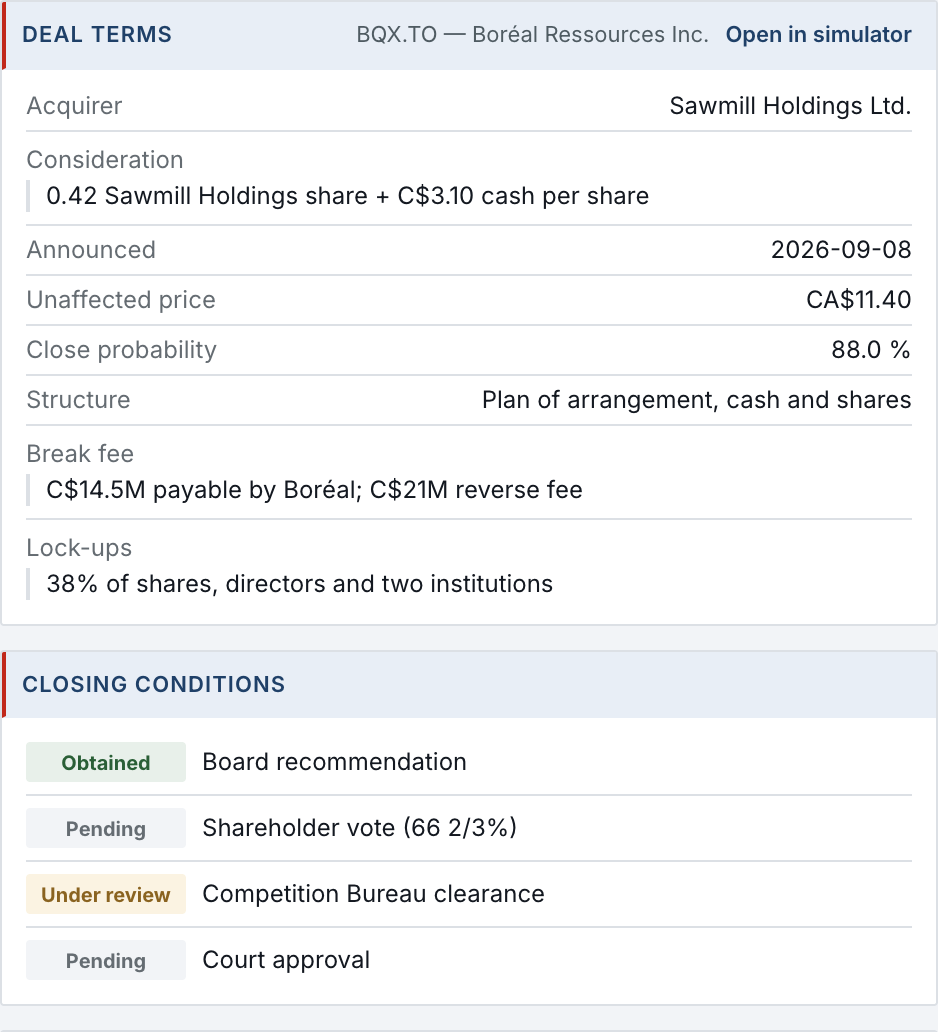
The deal file holds what the filing says and what still has to happen. It sits beside the monitor, for the deal you select.
- Terms
- Acquirer, consideration, announcement date, unaffected price, close probability, structure, break fee and lock-ups.
- Conditions
- Each closing condition with its state: Obtained, Pending or Under review.
- Break
- The break scenario: the floor if the deal breaks, the downside, the gain and annualized return if it closes, and the expected value.
- Simulator
- Open in simulator loads the deal into its simulator with these terms.
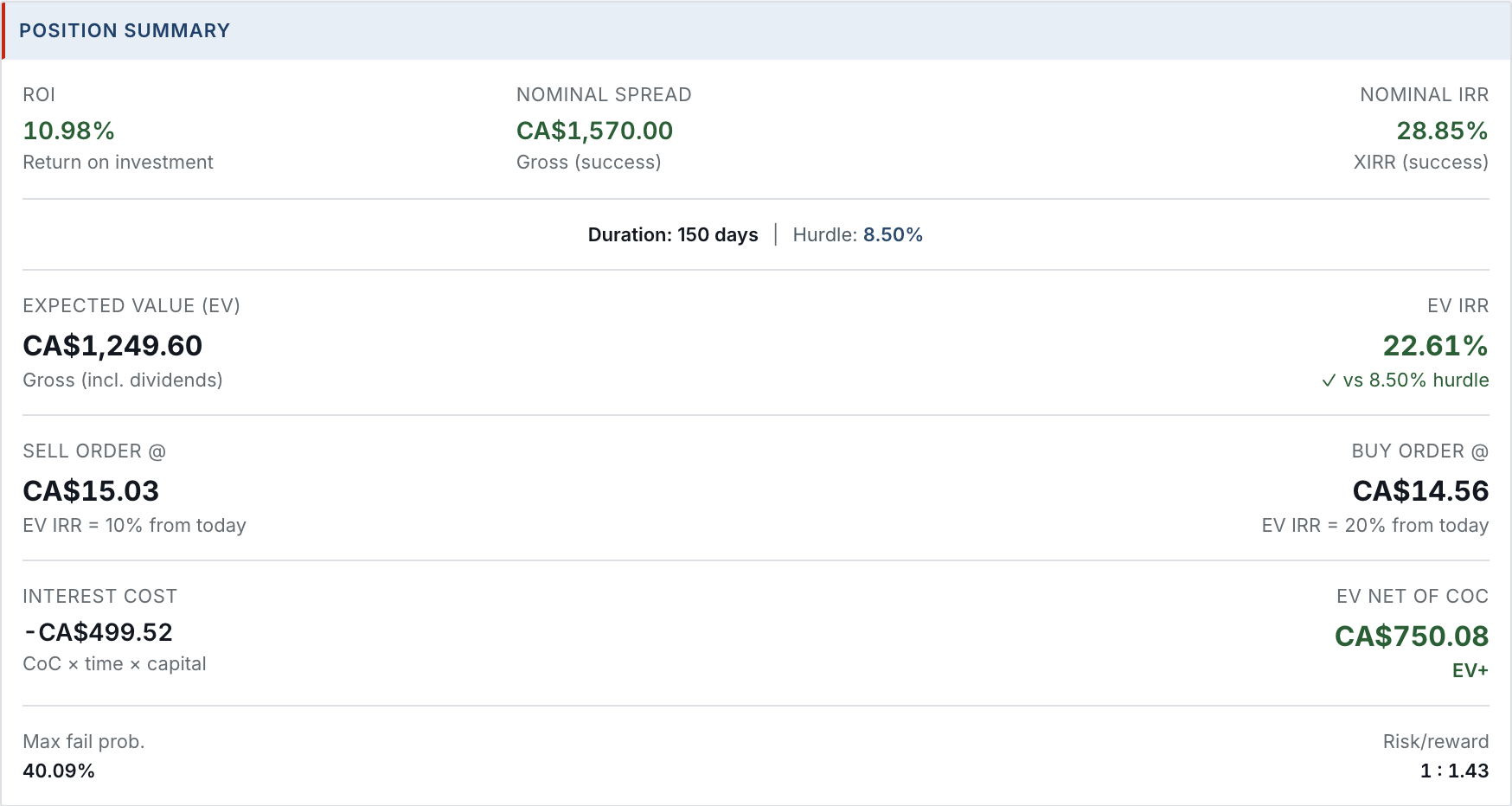
The simulator turns the file into a position.
Opened from the monitor, the Cash Deal Simulator takes the entry price, the offer, the break price and the close probability. It returns the ROI, the nominal spread and IRR, the expected value and its EV IRR against your hurdle, the sell and buy orders at your EV IRR thresholds, the interest cost and the risk/reward.

Milestones count down to the close.
The timeline puts the dated milestones of a deal in order, from the announcement to the outside date, each marked done or counted in days.

- Milestones
- The dated steps of the deal profile: the announcement, the shareholder meeting, the expected closing, the outside date.
- Countdown
- A milestone whose date has passed is marked done; each one ahead shows the days left, D-31 to the vote.
- Order
- Oldest first or newest first, in one click.
- Medians
- Median spread, median annualized return and median probability, with the average days to close, across the deals shown.
- Archive
- A closed or broken deal is archived with its file, and can be restored.
- Update
- A newer analysis updates an existing deal through a visible change plan; nothing is saved until you click Save.
What it needs.
The monitor, the simulators and the deal files need no other account. Two parts reach outside.
- Nothing else
- The monitor, both simulators, deal terms, conditions, milestones and break scenarios.
- Market data
- Current prices of targets and acquirers come from a market-data provider, with no account of yours.
- Your assistant
- Importing a deal from a special-situation analysis, or updating one, uses the analysis your assistant produced.
Merger Arb in Features
All 74 features →| # | Feature | What it does | Needs |
|---|---|---|---|
| 03 | Merger Arb | Every deal from both simulators in one table: signal, spread, annualized return, EV IRR, close probability, estimated close. Median stats; deal terms, closing conditions, break scenario, position and timeline panels; archive and restore. | Nothing else |
| 04 | Cash Deal Simulator | XIRR on cash mergers, liquidations and tender offers, with dated cash payments and a break scenario. | Nothing else |
| 05 | Share Deal Simulator | Stock-for-stock spreads and hedge ratios; expected value and break IRR for mixed consideration. | Nothing else |
| 06 | Deal import & update | Fill either simulator from a special-situation analysis, or update an existing deal with a visible change plan. Nothing is saved until you click Save. | Your AI assistant |
Access is granted in small batches.
Create your account now. It waits until access is granted, and nothing is charged.
- 01
Sign in at app.norlyst.com with Google or Apple.
- 02
Your account waits on a page that says so; no workspace opens yet.
- 03
Access is granted, and your workspace opens at your next sign-in, on every device.
Questions first? [email protected] · Privacy